


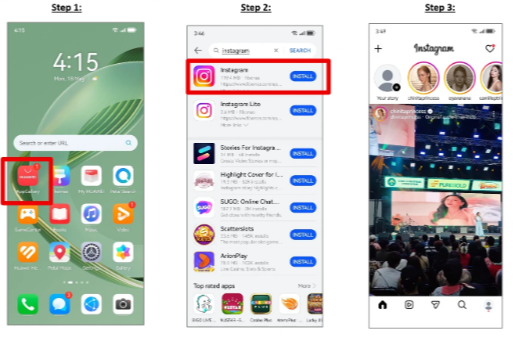
When people are unsure how to install an app on a new phone, the temptation is to search the web for a download file. The Huawei Community page for Instagram points in a simpler direction. It tells users to get Instagram from AppGallery, which keeps the installation inside Huawei’s own app store flow.
Use AppGallery instead of starting with random downloads
Open Huawei AppGallery, search for Instagram, and tap Install. That is the installation method shown on the page. Huawei also states that Instagram works properly on its phones.
So if you are searching huawei instagram, the safest answer supported by this source is not an unofficial installer. It is the AppGallery result already available on the device.
Finish the setup by signing in
After installation, open Instagram and sign in to your account. The source does not insert any extra utility between the store and the login screen.
That simplicity is important. The more installation methods you mix together, the harder it becomes to know where an app came from. For Instagram, this page gives you one clear route from search to sign-in.
Why the source does not need a second method
Some Huawei app guides describe alternatives when an app is unavailable. This Instagram page does not. Its solution is AppGallery, and it describes the app as working properly.
A faithful rewrite should keep that distinction. Adding GBox, microG, a browser workaround, or another store would go beyond what this page actually says.
Follow the same rule with other apps
The page ends with advice that applies beyond Instagram: always check AppGallery first when you want a new app. Huawei describes that as the safest and fastest starting point, with no extra steps needed when the app is already there.
That is especially useful when a phone is being set up for everyday use. A consistent first source is easier to remember than a different download method for every app.
What to do if you still need help
Huawei includes two QR-based help options on the page. Users can open a step-by-step TikTok tutorial or contact Huawei customer support.
Those help routes matter because the page itself does not claim to cover every possible screen or account issue. If the normal AppGallery flow does not match your device, support is the next source-backed step.
Why this route is enough
The Community post also gives a simple confidence signal: it says Instagram works properly on Huawei phones. That is why the source does not spend time presenting competing installation methods. The written path is meant to be enough for the normal case. Keeping that same emphasis in an SEO rewrite makes the article clearer and prevents a straightforward AppGallery install from sounding like a workaround.
One more point from the source
The source also presents AppGallery as the safest and fastest place to start. That supports the same approach here: use the built-in store first and turn to Huawei help channels if the normal result differs on your phone.
Keep the process easy to repeat
The huawei instagram setup is easy enough to remember without notes: open AppGallery, search Instagram, install, open the app, and sign in. The real value of the guide is that it removes the need to improvise.
When the official route already works, the safest setup is often the least complicated one. Use the store Huawei recommends, complete the sign-in, and keep the same AppGallery-first habit for the next app.
